
For finance leaders overseeing Shopify-driven revenue, reconciliation is about proving completeness and accuracy, especially when payments don’t flow through Shopify Payments.
When Authorize.Net sits between Shopify and NetSuite, critical payment identifiers often don’t land cleanly in the ERP. Funds settle, but deposits and refunds can’t always be traced back with confidence. The result isn’t just extra work, it’s uncertainty that slows close, expands exception reviews, and complicates audit conversations.
At Hairball, we’ve built a reconciliation frame for Shopify + Authorize.Net + NetSuite that gives controllers and CFOs what they actually need: a consistent way to tie every captured or refunded dollar to a verifiable NetSuite transaction, with a clear audit trail and minimal manual intervention.
Why some Shopify brands use third-party payment gateways like Authorize.net
While Shopify Payments is the default choice for many merchants, eligibility is limited by Shopify based on product categories, regulatory requirements, and country availability. As a result, some otherwise mainstream brands –particularly those operating internationally or selling regulated products– use a third-party payment gateway such as Authorize.Net to accept card payments on Shopify.
For finance teams, the key consideration isn’t the payment provider itself, but how that choice impacts payment traceability, reconciliation, and month-end close in NetSuite.
When transaction identifiers don’t flow cleanly from Shopify and the payment gateway into NetSuite, reconciliation becomes manual, exception-heavy, and difficult to audit, especially as order volume, refunds, and partial captures increase.
The key point: using Authorize.Net is a valid Shopify setup, but it changes what “good reconciliation” requires.
The real issue: reconciliation breaks when IDs don’t match
Finance teams don’t reconcile “payments” in the abstract, they reconcile specific transactions:
- Shopify order / payment intent
- PSP/gateway transaction(s)
- NetSuite customer deposit(s), refund(s), deposit applications, and invoices
When your NetSuite records are missing the correct gateway transaction ID, you get classic symptoms:
- Manual matching using spreadsheets and exports
- “Missing transaction” exceptions during close
- Duplicate investigation work across Ops + Accounting
- Low confidence in refund accuracy and fee tie-outs
And with Authorize.Net specifically, there’s an extra technical wrinkle that trips up many implementations.
Why Authorize.Net is tricky: reporting is batch-oriented
Authorize.Net does provide transaction reporting APIs, but the workflow tends to be reporting-first rather than “fetch exactly the one transaction I need with the one key I have.”
A common practical approach is:
- Identify a batch
- Pull a transaction list for that batch
- Then retrieve transaction details for the specific item(s)
Even Authorize.Net’s own samples illustrate getTransactionList by batchId with paging limits.
That batch orientation is exactly why reconciliation often becomes a multi-step workflow instead of a single lookup.
Hairball’s solution frame: Authorize.Net Reconciliation for Shopify
The goal is simple:
Persist the Authorize.Net Transaction ID(s) onto the right NetSuite records (and make them searchable), so reconciliation becomes a lookup, not an investigation.
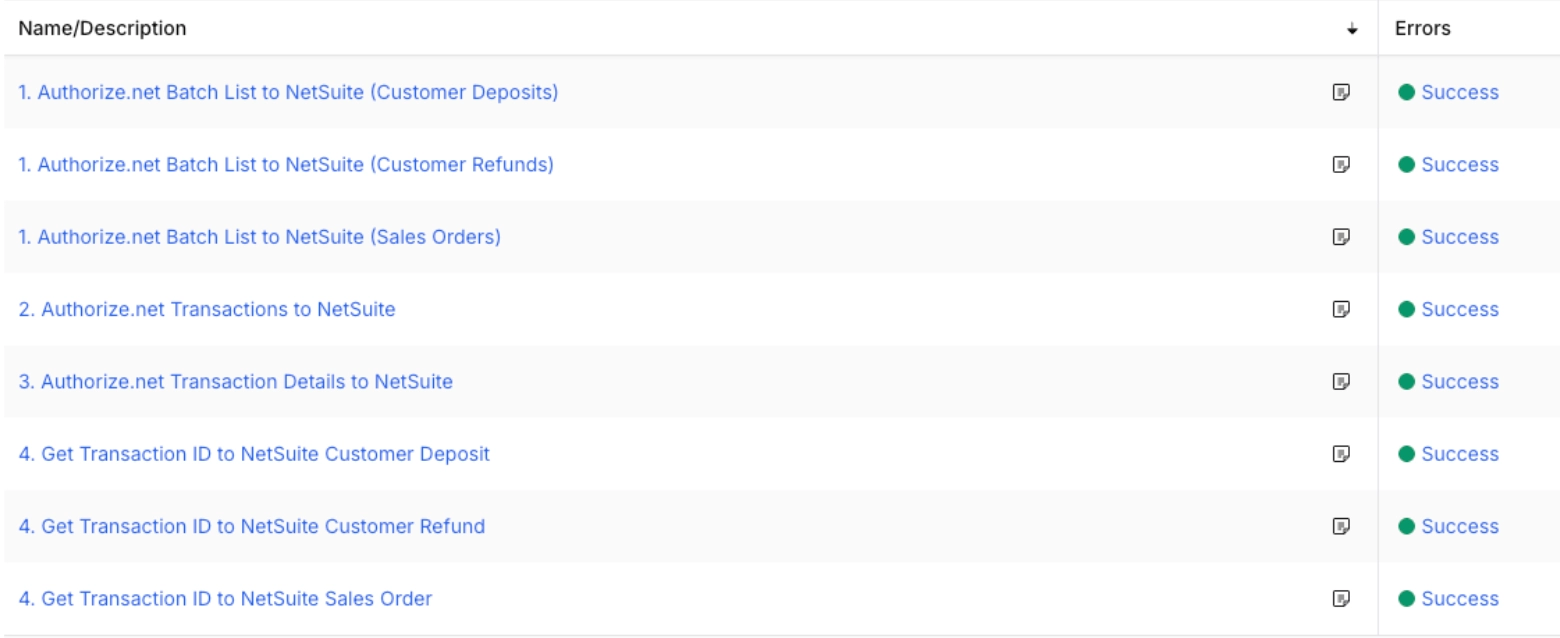
Hairball’s approach is to implement a small reconciliation “spine” that:
- Pulls Authorize.Net transactions via batch reporting
- Builds a mapping layer in NetSuite (via custom records)
- Updates the right Shopify-originated transactions in NetSuite (sales orders / deposits / refunds)
- Prevents duplicates and avoids race conditions in automation
This fits naturally into a Celigo-centered operating model, where integration is treated as a living business process, not a one-time sync.
How Payment Reconciliation Works for Shopify, Authorize.Net, and NetSuite
Core components
1) A NetSuite-side reconciliation index (custom records)
Instead of trying to “find everything in real time,” we create lightweight custom records to store:
- Authorize.Net Batch ID
- Authorize.Net Transaction ID
- A Shopify/NetSuite join key (often the Shopify payment identifier carried into NetSuite)
- Status flags (processed / matched / needs review)
This becomes your internal source of truth for matching and troubleshooting.
2) A controlled Authorize.Net batch pull (date-windowed)
Because you can’t always retrieve a transaction directly the way you’d like, we pull by date window and batch. The implementation usually uses a buffer window (e.g. 1 day) around the Shopify transaction creation time to avoid edge misses due to settlement timing.
3) A NetSuite update step that “stamps” IDs where finance needs them
Once the mapping exists, we update the NetSuite record(s) that matter for reconciliation:
- Customer Deposit (most common for Shopify captured-at-order flows)
- Customer Refund (when applicable)
- Related transaction references (so future searches work across the whole chain)
Step-by-Step Payment Reconciliation Flow for Shopify, Authorize.Net, and NetSuite
Step 1: Start from what NetSuite already knows (the Shopify-originated transaction)
We begin with the NetSuite transaction created from Shopify (commonly the Sales Order / Customer Deposit relationship). This keeps the process grounded in ERP reality: if it’s not in NetSuite, it’s not reconcilable yet.
Step 2: Use the Shopify payment identifier as the join key
Shopify and your integration typically carry a payment identifier that’s consistent enough to match against Authorize.Net detail fields once you have the right transaction.
Step 3: Pull Authorize.Net batches for a tight date range
Authorize.Net’s reporting patterns encourage a “batch → transaction list → details” approach.
So we pull batches by date window, then pull transactions per batch (paged), then pull details for candidate matches.
Step 4: Write a reconciliation index record in NetSuite
For each transaction processed, the following data is stored:
- Batch ID
- Transaction ID
- Join key (Shopify payment ID / purchase order number equivalent, depending on your mapping)
- Links to the relevant NetSuite transactions
This is what makes the solution maintainable, because it’s auditable and searchable.
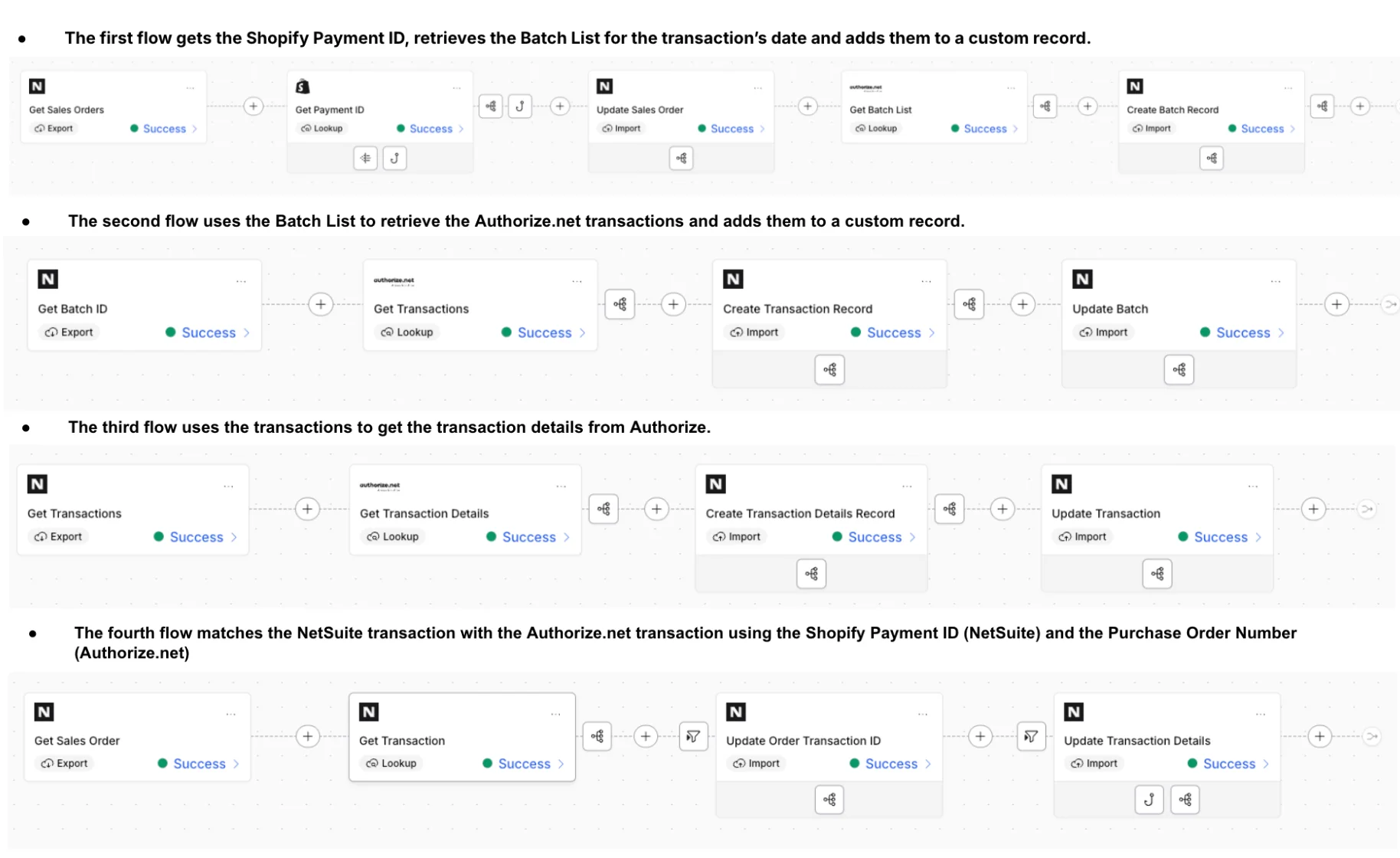
Step 5: Update NetSuite with the Authorize.Net Transaction ID (and mark processed)
Once matched, we stamp:
- A dedicated Authorize.Net Transaction ID field
- A processed flag to prevent rework
- Optionally, multi-select / relationship fields when there are multiple transactions per order (captures + refunds, partials, etc.)
Operational Outcomes of Authorize.Net Reconciliation for Shopify
Faster, less stressful month-end close
When the transaction ID is on the record, your team stops hunting. Instead they:
- Search NetSuite by Authorize.Net Transaction ID
- Validate deposit/refund presence
- Resolve exceptions with a clear audit trail
Higher confidence in refunds and multi-transaction orders
Refunds are where many integrations degrade. A reconciliation index makes it much easier to answer:
- Did we create the right NetSuite refund objects?
- Are we missing a refund transaction ID?
- Is this an “in NetSuite but not in gateway” issue, or the reverse?
Clearer exception handling
You can explicitly track:
- unmatched transactions
- not-yet-imported NetSuite records
- timing issues
- true discrepancies that need human intervention
When this solution is a strong fit
This pattern is ideal if you:
- Run Shopify + NetSuite
- Use Authorize.Net as your payment gateway on Shopify
- Are tired of manual payment matching during close
- Have enough volume that “just export a report” is no longer reliable
- Want an approach that supports growth (new channels, new refund scenarios, more complexity)
Hairball regularly builds and supports these kinds of NetSuite + Celigo operating models, including payment reconciliation as a first-class workflow.